Token model
Tokens represent any asset with an expiration date that you cannot afford to miss: certificates, API keys, secrets, contracts, licenses, memberships. Each token lives inside a specific workspace. Alerts use the workspace defaults (thresholds and enabled channels); recipients and, optionally, thresholds can be overridden per token by selecting a contact group.
A TokenTimer token is the item being tracked, not a credential. Credentials that authenticate against TokenTimer's API are called machine API tokens (see Certificate automation); credentials you supply to integrations (GitHub PATs, Vault tokens) are used once for scanning and never stored.
- Lifecycle: create the token with an expiration date, TokenTimer tracks status and sends alerts as thresholds are reached, then marks it expired if the date passes.
- Visibility: color-coded status in the dashboard and usage views to prioritize renewals.
- Ownership: who receives alerts comes from the token's contact group (a named list of recipients and channels). By default, the workspace's initial contact group is used (owner's email).
Fields and categories
Every token needs a name, category, and type. You can also add an expiration date, organize tokens into sections, and include additional details.
Required:
- Name — a descriptive name for your token (3-100 characters)
- Category — one of: Certificates, Keys & Secrets, Licenses, or General (API values:
cert,key_secret,license,general) - Type — the specific type within the category (for example SSL certificate, API key, software license)
Optional:
- Expiration date — when the token expires (if left empty, the token is marked as "never expires")
- Section — group related tokens together (for example "Production", "Development")
- Description & notes — helpful context or reminders
- Contacts — people to notify about this token
Category-specific details:
- Certificates — domains, issuer information, and certificate details
- Keys & Secrets — where they are stored and rotation instructions
- Licenses — vendor name, number of seats, renewal dates, and costs
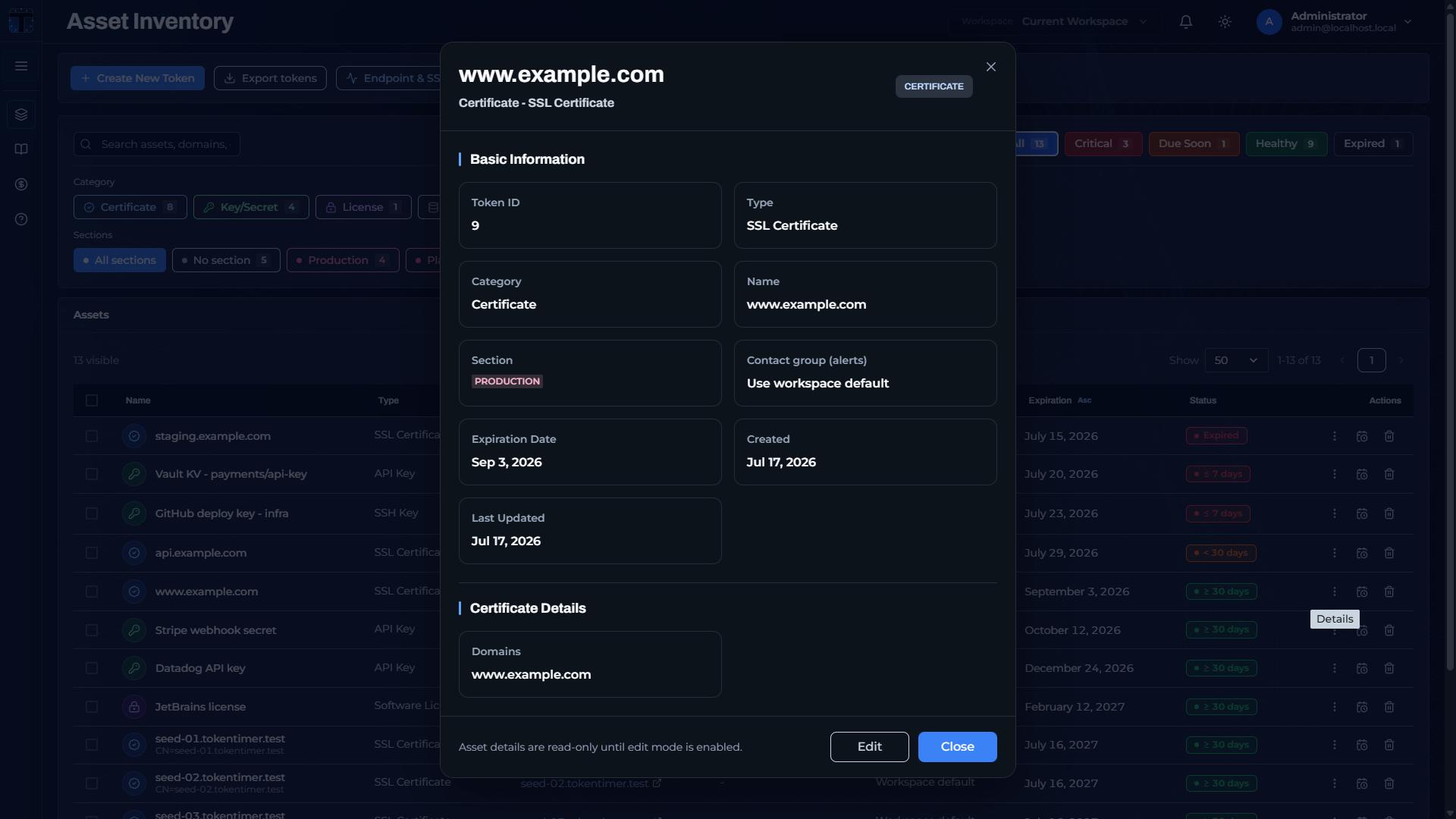 Token detail view: basic information, section, contact group, and category-specific certificate details.
Workspace scoping
Default thresholds and channels are configured at the workspace level. Recipients and (optionally) thresholds may be overridden by assigning a token to a contact group. Role-based access means only members of the workspace can view or manage its tokens.
- Changing workspace default thresholds affects tokens that do not use a group thresholds override.
- Use sections to reflect environments or teams (for example Production vs. Staging) and filter views.
- Assign a contact group to route alerts to a team and, if needed, apply a different thresholds policy.
- Self-hosted TokenTimer has no plan tiers or token caps: workspaces can hold as many tokens as your database can store.
Getting tokens into TokenTimer
Beyond creating tokens one by one in the dashboard, you can:
- Import from a file (CSV, XLSX, JSON, YAML)
- Connect an integration (Vault, GitHub, GitLab, AWS, Azure, Entra ID, GCP), optionally with scheduled auto-sync for GitHub and GitLab
- Monitor an HTTPS endpoint, which auto-creates an SSL certificate token
- Discover subdomains with the Domain Checker and bulk-import their certificates
- Use the REST API to create tokens programmatically