Connect an MCP assistant
Find tokens, import inventory metadata and inspect certificate operations from your assistant. Remote HTTP is recommended: connect by URL and sign in, with no Node installation.
Choose your connection
Open Preferences → MCP assistants → Connect an MCP assistant.
| Method | Choose it when | Requires |
|---|---|---|
| Remote HTTP · Recommended | Browser sign-in without installation. | Streamable HTTP and OAuth support; reachable HTTPS server. |
| Local adapter (stdio) | Your client supports only stdio. | Node 24, reviewed Core checkout, private credential file. |
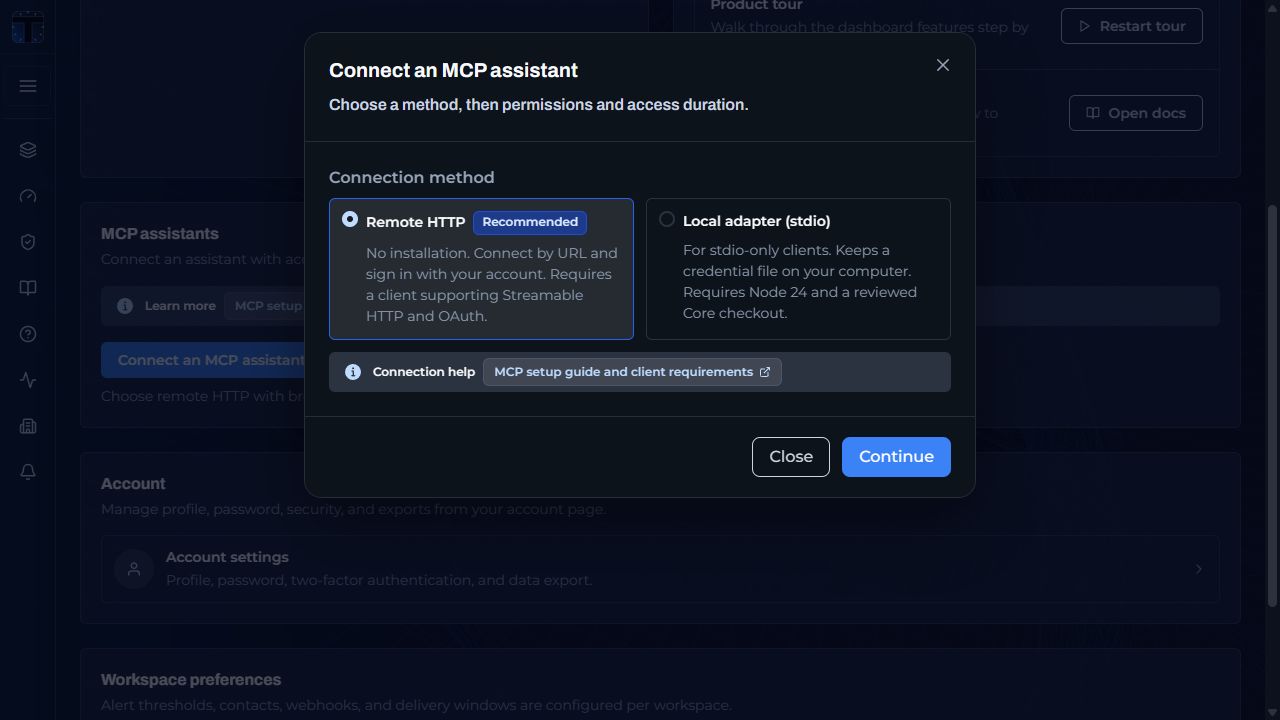
Recommended: remote HTTP
- Select Remote HTTP, then Continue. Choose permissions and access duration; Copy server URL.
- Add that URL as a remote Streamable HTTP server in your MCP client. Choose Sign in and complete your normal TokenTimer sign-in or Enterprise SSO.
- Check the app, return address, workspace and permissions, then Connect.
Back in your client, run
tt_whoamito confirm access.
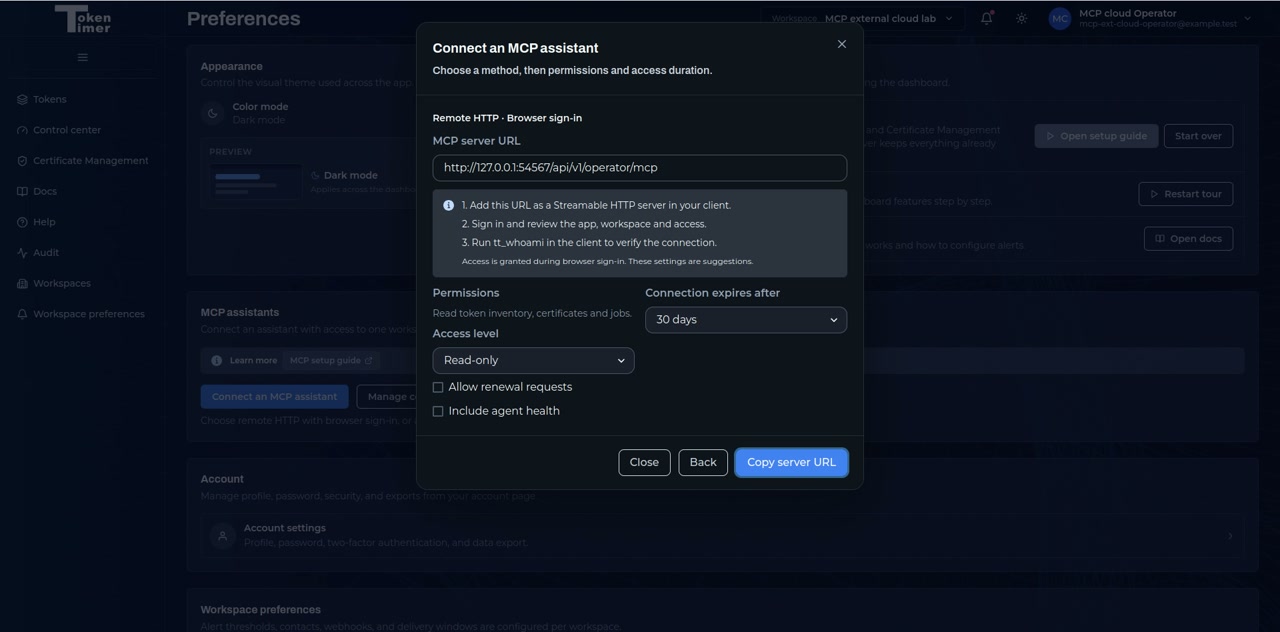
The screenshots use a local test server. Use your deployment's HTTPS URL; hosted assistants cannot reach your laptop's localhost.
Choose access
| Permission | Practical use |
|---|---|
| Read only | Find GitLab deploy tokens by provider/location; inspect certificates and jobs. |
| Read-write | Choose reviewed inventory imports and updates independently. Updates exclude certificates and provider-managed records; secrets are rejected. |
| Agent health | Inspect executor availability; included with issuance and renewal permissions. |
| Renewal requests | Managers request an existing certificate's ACME renewal; workspace renewal permission and Job approval apply. |
| Issuance requests | Managers request ACME issuance; a separate workspace switch and Job approval apply. |
| Contacts, webhooks, groups and invitations | Grant each reviewed action separately; invitations grant viewer access. |
Read-only is the default, including for workspace managers. Choose read-write explicitly; inventory updates and renewal requests require separate selection. Selecting Read-only clears all write permissions. Job approval On waits for another approver; Off allows execution. Inventory import uses its own reviewed preview. Assistants cannot approve jobs or change settings.
Choose an expiry (default 30 days) or acknowledge No expiry. Revoke anytime under MCP assistants → Manage connections. Cloud MCP access requires Pro or Team.
Available tools
Your assistant can call these tools when the connection has the required permissions:
| Purpose | Tools |
|---|---|
| Connection and inventory | tt_whoami, tt_list_tokens, tt_get_token, tt_list_sections, tt_list_similar_tokens |
| Reviewed inventory import | tt_preview_inventory_import, tt_import_inventory |
| Reviewed inventory update | tt_preview_inventory_update, tt_update_inventory |
| Workspace contacts | tt_preview_contact_create, tt_create_contact |
| Workspace webhooks | tt_preview_webhook_create, tt_create_webhook |
| Contact groups | tt_list_group_sources, tt_preview_contact_group, tt_create_contact_group |
| Certificate issuance | tt_preview_issuance, tt_request_issuance |
| Workspace members | tt_preview_member_invite, tt_invite_member |
| Certificates and agents | tt_list_certificates, tt_get_certificate, tt_get_certificate_observations, tt_explain_certificate_state, tt_get_agent_health |
| Jobs and certificate requests | tt_list_jobs, tt_get_job, tt_preview_renew, tt_request_renew, tt_list_my_requests, tt_get_action_request, tt_cancel_request |
Certificate issuance requires a separate connection permission and workspace switch. Review the certificate, issuer, agent and installation destination before submitting; Job approval follows workspace settings. Successful issuance can establish a renewal profile.
Similar inventory means records with the same type and category, not confirmed duplicates. Contact, webhook and group creation require separate permissions and previews; delivery channels still need verification. Webhook previews hide sensitive destination details, but the assistant receives them as input, so use a trusted client. Member invitations grant viewer access only and follow the workspace's invitation policy.
Viewer invitations need separate permission. Existing users gain access immediately; new users receive an invitation. Check the email status if delivery failed or is unknown.
Agent health requires manager access. Imports and renewal requests need their respective write permissions; availability also depends on workspace and edition settings.
Optional: local adapter (stdio)
Choose Local adapter (stdio), select access and create a code. From a reviewed Core checkout:
pnpm install --frozen-lockfile
node packages/mcp/bin/tokentimer-mcp.js enroll --api-url https://your-server.example
Enter the code at the hidden prompt and add the printed client configuration.
Keep the checkout and credential file private. Write tools need
TOKENTIMER_MCP_ENABLE_WRITES=true.
Adapter reference.
Administrator setup
- Enable
MCP_OPERATOR_INTERFACE_ENABLEDandMCP_OPERATOR_REMOTE_ENABLED. SetMCP_PUBLIC_URLto the external HTTPS endpoint ending/api/v1/operator/mcp. - Set the dashboard URL with
APP_URL(Cloud:FRONTEND_URL). Route/api/v1/mcp/oauth/*and both/.well-known/oauth-*discovery paths to the API, preserving Host and port. - Add browser-client origins to
MCP_ALLOWED_ORIGINSwhen needed. Clients must support dynamic client registration; metadata URL registration is unsupported. - Enable
MCP_OPERATOR_WRITES_ENABLEDfor assistant write actions; workspace and connection permissions still apply.
Self-hosted MCP deployment flags default to off. See the configuration reference for Helm keys and the approval guide for review details.